Suggest Verification Methods: On the Fly Enrollment for Verification Methods
Overview
Suggest verification methods is a token condition evaluated before token issuance. This feature enables on-the-fly enrollment by proposing additional verification methods to users after authentication or single sign-on.
Users have flexibility with optional verification methods:
- Skip - Dismiss the suggestion for now
- Do Not Ask Again - Permanently dismiss the suggestion
- Enroll - Set up the verification method immediately
Mandatory verification methods can be temporarily skipped if the enrollment due date has not yet been reached, allowing users time to prepare before enforcement begins.
When to Use Suggest Verification Methods
Onboarding New Users
-
Scenario: A company enables multi-factor authentication, but users initially have access to only one verification method.
-
Solution: Suggest additional verification methods during onboarding to ensure users can set up multiple factors immediately, enabling true multi-factor authentication from day one.
-
Benefit: Establishes strong security practices at the start of the user journey.
Improving User Experience
-
Scenario: Users default to passwords but may be unaware of more convenient authentication options.
-
Solution: Proactively suggest modern verification methods like biometrics, push notifications, or passwordless authentication.
-
Benefit: Introduces users to easier, more convenient authentication methods they might not discover on their own, improving overall satisfaction and adoption.
Migration and Modernization
-
Scenario: Organizations need to transition users from existing verification methods to new ones for cost optimization or enhanced security.
-
Challenges:
- Users become accustomed to their current verification method
- Difficult to encourage voluntary switching
- Need to phase out legacy methods
-
Solution: Use suggested verification methods to:
- Gradually introduce cost-effective alternatives
- Promote state-of-the-art security methods
- Provide clear migration paths with grace periods
- Benefit: Enables smooth transitions to modern authentication methods while managing costs and improving security posture.
Benefits
- Encourages multi-factor authentication adoption
- Enables migration to stronger, modern authentication methods
- Reduces account compromise risk
- Seamless enrollment without disrupting workflow
- Users discover more convenient authentication options
- Flexible choices with grace periods for mandatory methods
Introduction to Suggest Verification Methods
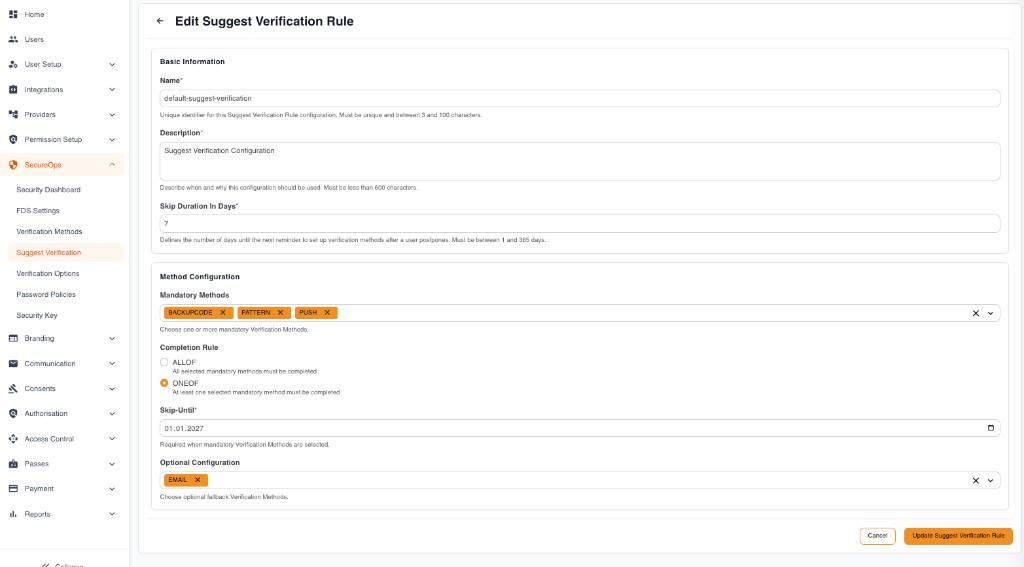
Suggest Verification prompts users based on your Suggest Verification rule (configured under SecureOps → Suggest Verification in Trustdesk). The scenarios below show which part of that rule drives each prompt — the highlighted area marks the relevant setting.
MFA required, but only one verification method available
The user has EMAIL configured but needs at least one further method allowed by the app to perform multi-factor authentication. They are prompted with a selection (for example FIDO and FACE) to complete the enrollment, with no option to skip.
Mandatory verification methods
When you configure mandatory verification methods, the user must enroll for those until the due date is reached. It is skippable until the due date (Skip-Until) passes.
Optional verification methods
When you configure optional verification methods, the user may enroll but can also skip or click "don't ask again". The Skip Duration in Days defines when to prompt again if skip was clicked.
Understanding the Flow and APIs
Complete Flow
-
Get Prevalidation Metadata: After authentication, if
suggest_verification_methodsprecheck is required, retrieve the prevalidation metadata using the track_id to see which verification methods are suggested. -
User Decision: The user can choose to:
- Skip - Temporarily dismiss the suggestion (will be asked again later)
- Do Not Ask Again - Permanently dismiss the suggestion (until admin changes)
- Enroll - Set up the verification method immediately
-
Enrollment Process (if user chooses to enroll):
- Initiate enrollment for the selected verification method
- Complete the enrollment/authentication
- Optionally add a friendly device name
API Reference
| API | Description | Link |
|---|---|---|
| Get Prevalidation Metadata | Retrieve the prevalidation response containing the track_id and suggested verification methods. This is the first step in the suggest verification methods flow. | View API |
| User Action (Skip/Do Not Ask Again) | Submit the user's decision to skip or permanently dismiss the suggested verification methods. Use this API when the user chooses not to enroll immediately. | View API |
| Enrollment Initiation | Initiate the enrollment of a verification method (e.g., authenticator app, FIDO2). This provides the URL/QR Code needed for enrollment. | View API |
| Enrollment Status | Check the enrollment status to determine when to continue with enrollment completion. This is useful for asynchronous methods like Push or FIDO2. | View API |
| Enrollment Completion | Complete the enrollment after successfully authenticating via the verification method (e.g., authenticator app, FIDO2). | View API |
| Add Friendly Device Name | Add a user-friendly name for device-based authentication methods like FIDO2 to help users identify their devices. | View API |
Explore Related Topics
Please contact us on our Developer Support Page.