Token Exchange
The OAuth 2.0 Token Exchange (RFC 8693) is a standardized flow that allows a client to exchange one token for another. This is distinct from the standard OAuth authorization code or client credentials flows and is particularly useful in microservices architectures, token delegation scenarios, and when you need to transform tokens for different contexts.
See Standards & Security Extensions for how token exchange fits with resource indicators and other least-privilege options.
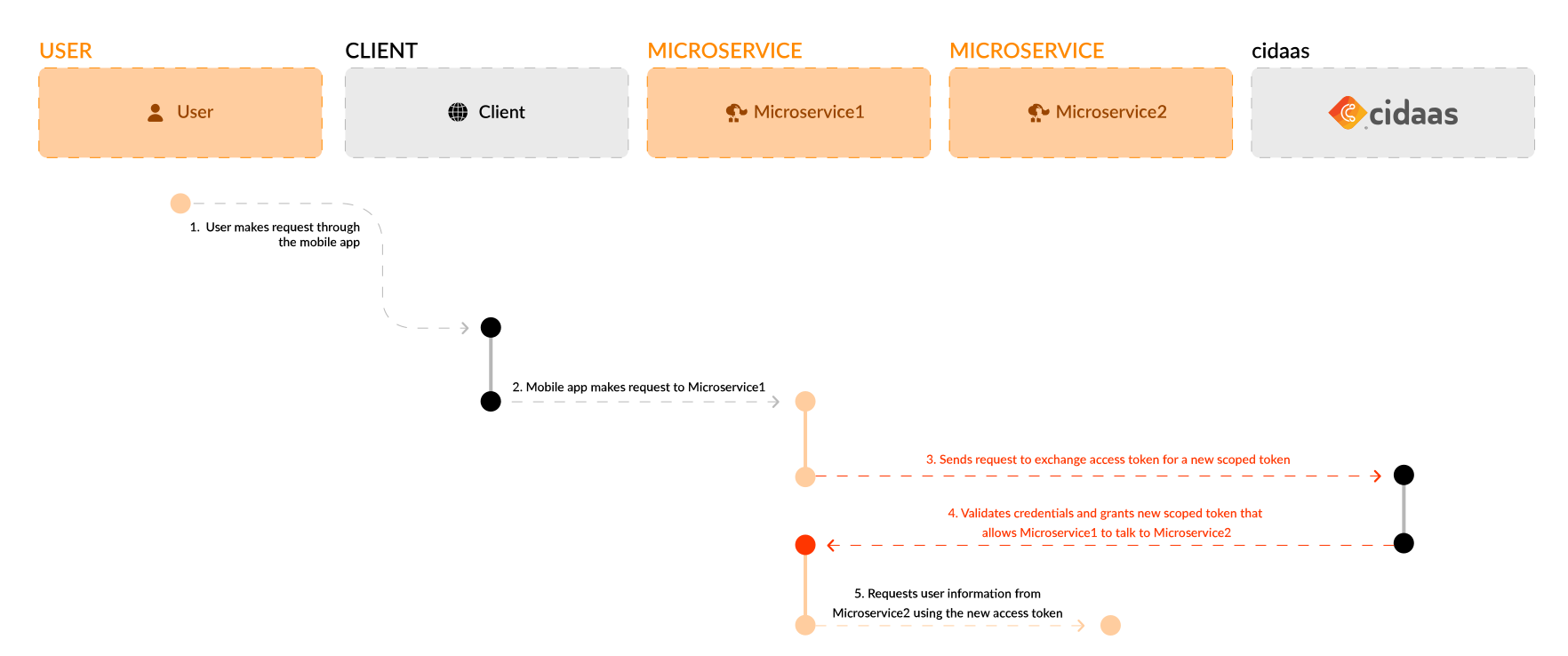
Token Exchange enables various token transformation scenarios:
- Access Token → Access Token: Exchange an access token for another access token with different scopes (downscoping or upscoping)
- ID Token → Access Token: Exchange an ID token for an access token to access protected resources
- User Token → Service Token: Transform a user's access token into a service token for backend-to-backend communication
- Cross-Domain Token Exchange: Exchange tokens between different authorization servers or domains
Understanding Token Exchange vs. Other Flows
It's important to understand that Token Exchange is not a standard OAuth authorization flow like Authorization Code or Client Credentials. Instead, it's a mechanism for transforming existing tokens. Here's how it compares:
| Flow | Purpose |
|---|---|
| Authorization Code | End-user sign-in + token creation |
| Client Credentials | Service authentication without user |
| Refresh Token | Get a new access token (same type/scope) |
| 🔄 Token Exchange | Convert existing tokens into new ones |
Key Difference: While other flows create tokens from credentials or authorization codes, Token Exchange transforms tokens you already have into different tokens with potentially different scopes, audiences, or types.
When to Use Token Exchange
Token Exchange is ideal for:
- Microservices Architecture: Services need to exchange tokens to communicate with each other while maintaining user context
- Token Delegation: Delegating access from one service to another with appropriate scopes
- Scope Transformation: Downscoping (reducing permissions) or upscoping (requesting additional permissions) tokens
- Backend-for-Frontend (BFF) Pattern: Exchanging user tokens for service tokens in backend services
- Cross-Domain Scenarios: Exchanging tokens between different authorization servers or domains
- Token Refresh Alternatives: When you need a different token type rather than just refreshing the same token
Key Advantages
- Token Transformation: Convert tokens between different types (access token, ID token, etc.)
- Scope Management: Adjust token scopes to match specific service requirements
- Audience Support: Request an
audienceso the exchanged token’saudclaim is set to the target service/API, ensuring the token can only be used by that recipient - Delegation Support: Enable secure token delegation in distributed systems
- User Context Preservation: Maintain user context when exchanging tokens
- Flexible Architecture: Support complex microservices and multi-tenant scenarios
How it Works
Before we step into how it works, let's understand some useful parameters.
| Parameter Name | Description |
|---|---|
grant_type | Must be urn:ietf:params:oauth:grant-type:token-exchange |
subject_token | The token you want to exchange (e.g., an access token, ID token) |
subject_token_type | Specifies the type of the token being exchanged. Common values: urn:ietf:params:oauth:token-type:access_token, urn:ietf:params:oauth:token-type:id_token |
scope | Optional. Defines the desired scopes for the new token. Used for downscoping or upscoping |
audience | Optional. Supported. Specifies the intended recipient(s) of the exchanged token. Can be a string (single audience) or an array of strings (multiple audiences). See Audience (aud) and resource below. |
resource | Optional. One or more RFC 8707 resource indicators (URI). When present, they are validated against the subject token and client, and applied to the access token aud (not the ID token). Repeat the form field for multiple values: resource=https://api.example/res1&resource=https://api.example/res2. |
client_id | Client identifier (required in Authorization header or request body) |
client_secret | Client secret (required in Authorization header or request body) |
Audience (aud) and resource
The audience (aud) identifies the intended recipient(s) of the exchanged token. You can set it with audience and/or with resource (RFC 8707). When resource values are present on the token request, they drive the access token audience; otherwise audience / prior client context applies as before.
Format for audience:
- String — single audience. Example:
audience=api-backend-service - Array — multiple audiences. In form-urlencoded requests:
audience=api-a&audience=api-b
Actor claim (act)
Token exchange issues an RFC 8693 act claim on the access token when the exchange represents an actor (delegation) chain. Introspection also surfaces act when present. The claim nests prior actors so relying parties can see the delegation chain. Same-client exchanges can carry forward an existing act from the subject token.
Step 1: The client application makes a POST request to the token endpoint with the subject_token, subject_token_type, grant_type=urn:ietf:params:oauth:grant-type:token-exchange, and optionally scope, audience, and/or resource.
Step 2: The authorization server validates:
- The subject_token is valid and active
- The client credentials (from Authorization header) are valid
- The requested scopes are allowed for the subject token
- The client has permission to perform token exchange
- Requested resource values (when present) are allowed for the client and subject token
Step 3: If validation succeeds, the authorization server issues a new token (typically an access token) with the requested scopes, audience/resources, and act when applicable.
Step 4: The client uses the new token to access protected resources with the transformed permissions.
Technical Integration
| API | Description | Link to API |
|---|---|---|
| Token Exchange | Exchange one token for another with potentially different scopes or audience. Supports the audience parameter so the issued token’s aud claim is set to the intended recipient (target service/API). | View API |
Example Implementation
Here are examples of common Token Exchange scenarios:
Example 1: Access Token → Access Token (Downscoping)
Exchange a user's access token for a new access token with reduced scopes:
POST https://{{base_url}}/token-srv/token
Content-Type: application/x-www-form-urlencoded
Authorization: Basic {{base64_encoded_client_credentials}}

grant_type=urn:ietf:params:oauth:grant-type:token-exchange
&subject_token={{user_access_token}}
&subject_token_type=urn:ietf:params:oauth:token-type:access_token
&scope=read:data
&audience=api-backend-service
Response: The issued access token will include aud: "api-backend-service" when audience=api-backend-service was requested.
{
  "access_token": "eyJhbGciOiJSUzI1NiIs...",
  "token_type": "Bearer",
  "expires_in": 3600,
  "scope": "read:data",
  "issued_token_type": "urn:ietf:params:oauth:token-type:access_token"
}
Example 2: ID Token → Access Token
Exchange an ID token for an access token. Include audience so the new token can only be used by the target API:
POST https://{{base_url}}/token-srv/token
Content-Type: application/x-www-form-urlencoded
Authorization: Basic {{base64_encoded_client_credentials}}

grant_type=urn:ietf:params:oauth:grant-type:token-exchange
&subject_token={{id_token}}
&subject_token_type=urn:ietf:params:oauth:token-type:id_token
&scope=api:read api:write
&audience=target-api-service
Example 3: User Token → Service Token
Transform a user's access token into a service token for backend communication:
POST https://{{base_url}}/token-srv/token
Content-Type: application/x-www-form-urlencoded
Authorization: Basic {{base64_encoded_service_client_credentials}}

grant_type=urn:ietf:params:oauth:grant-type:token-exchange
&subject_token={{user_access_token}}
&subject_token_type=urn:ietf:params:oauth:token-type:access_token
&scope=service:internal
&audience=internal-api-service
Base64 Encoding Example
To create the Authorization header, Base64-encode client_id:client_secret:
# Example: client_id="my-client-id", client_secret="my-client-secret"
# Encoded: bXktY2xpZW50LWlkOm15LWNsaWVudC1zZWNyZXQ=

Authorization: Basic bXktY2xpZW50LWlkOm15LWNsaWVudC1zZWNyZXQ=
JavaScript Example:
const credentials = btoa(`${client_id}:${client_secret}`);
const authHeader = `Basic ${credentials}`;
Security Considerations
Important: Token Exchange should only be performed by confidential clients (server-side applications) that can securely store the client_secret. Never perform token exchange from client-side code.
1. Confidential Client Requirement
- Only confidential clients (server-side applications) should perform token exchanges
- Ensure the
client_secretis securely stored and never exposed - Use environment variables or secret management systems
2. Authorization Header Security
- The
Authorizationheader must include valid credentials (Base64-encoded client ID and secret) - If credentials are compromised, attackers can perform malicious token exchanges, leading to privilege escalation
- Always use HTTPS/TLS for all token exchange requests
3. Scope Restriction (Principle of Least Privilege)
- Minimize the scope of the newly issued token to the least privilege required
- Use downscoping to reduce permissions when possible
- Avoid upscoping unless absolutely necessary and authorized
4. Subject Token Validation
- The Authorization Server validates the
subject_tokento ensure it is still active - The server verifies the token was issued to the correct client
- Expired or revoked tokens cannot be exchanged
5. Token Lifetime Management
- Use short lifetimes for exchanged tokens to limit exposure
- Ensure exchanged tokens are only active for the required backend service "session"
- Implement proper token caching and expiration handling
6. Audit and Monitoring
- Log all token exchange requests for security auditing
- Monitor for unusual patterns (e.g., frequent exchanges, unexpected scope requests)
- Alert on failed exchange attempts or privilege escalation attempts
Common Use Cases
Use Case 1: Microservices Token Delegation
A frontend service receives a user's access token and needs to call a backend microservice. The frontend exchanges the user token for a service token with appropriate scopes for the microservice.
Use Case 2: Scope Downscoping
A user grants broad permissions to an application, but the application needs to call a third-party API with limited permissions. The application exchanges the broad-scope token for a narrow-scope token.
Use Case 3: Backend-for-Frontend (BFF) Pattern
A BFF service receives user tokens from the frontend and exchanges them for service tokens to communicate with backend APIs, keeping the user context while using service credentials.
Use Case 4: Cross-Domain Token Exchange
An application needs to access resources in a different domain. It exchanges its current token for a token valid in the target domain.
Comparison with Other Flows
| Aspect | Token Exchange | Client Credentials | Authorization Code |
|---|---|---|---|
| User Interaction | ❌ No | ❌ No | ✅ Yes |
| Client Secret | ✅ Required | ✅ Required | ✅ Required |
| Use Case | Token transformation, delegation | M2M, Backend | User authentication |
| Input | Existing token | Client credentials | User credentials |
| Output | New token (different type/scope) | Access token | Access token |
| Best For | Microservices, token delegation | Server-to-server | User-facing apps |
References
Please contact us directly on our support page or reach out to cidaas support at [email protected].